


At CustomKings, we take immense pride in crafting unique and high-quality personalised gifts and corporate branding solutions for our valued customers across Australia. Whether it’s intricate engraving, vibrant UV printing, or detailed embroidery, our goal is always to achieve the best possible result that truly reflects your vision. A crucial factor in achieving this premium finish, especially when working with logos, graphics, or specific designs, lies in the type of digital image file provided.
You may have heard terms like raster and vector, or perhaps seen requests for specific file types like SVG, AI, EPS, PDF, JPG, or PNG. Understanding the difference between these formats, particularly vector vs raster, is key to ensuring your logo file format or image is perfectly suited for our production processes. This guide will delve into the characteristics of each image type, explain why we often require a vector image for optimal results in engraving, UV printing, and embroidery, and help you ensure you supply the best possible file for your CustomKings order.
Understanding Image File Types: Raster vs. Vector Fundamentals
Digital images primarily fall into two categories: raster and vector. While both can display visuals, they are constructed fundamentally differently. This difference significantly impacts how they can be scaled, edited, and ultimately reproduced on physical products. Choosing the right format is not just a technical preference; it directly influences the clarity, sharpness, and overall quality of the personalisation on your chosen item. Our aim is to leverage the best format for each application to deliver results that exceed expectations.
Delving into Raster Images: The World of Pixels
Raster images are the most common type of digital image file we encounter daily, especially in photography.
What is a Raster Image?
Think of a raster image as a detailed mosaic or a grid made up of tiny squares called pixels (picture elements). Each pixel has a specific location and colour assigned to it. When viewed together, these millions of pixels form a complete image.
- Common File Types: The most familiar raster formats include JPG (or JPEG), PNG, GIF, TIFF, BMP, and HEIC (common on newer iPhones).
- Primary Use: Raster formats are ideal for complex images with intricate colour gradients, shading, and detail, such as photographs.
- Creation: They are typically created by digital cameras, smartphones, scanners, or through pixel-editing software like Adobe Photoshop.
The Critical Concept of Resolution (DPI/PPI)
Because raster images are pixel-based, their quality is inherently tied to their resolution. Resolution refers to the density of pixels within a given area, usually measured in DPI (Dots Per Inch) for printing or PPI (Pixels Per Inch) for digital displays.
- Higher Resolution = More Detail: An image with a higher resolution (e.g., 300 DPI) contains more pixels per inch than a low-resolution image (e.g., 72 DPI, common for web use). More pixels mean more detail and a potentially clearer printed result at its original size.
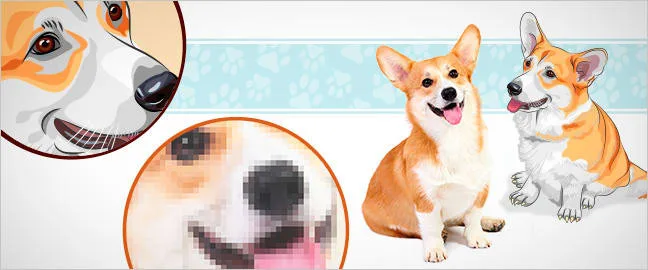
- The Scaling Problem: The challenge arises when you try to enlarge a raster image significantly beyond its original dimensions. The software must guess what colour the new pixels should be, leading to interpolation. This often results in the image appearing blurry, jagged, or “pixelated” (where you can visibly see the square pixels). The quality degrades because you are essentially stretching the existing pixels larger; you cannot magically add more detail that wasn’t there initially.
Advantages of Raster Images
- Photorealistic Detail: Unmatched in rendering the complex colours and tones found in photographs.
- Broad Compatibility: Raster file formats like JPG and PNG are widely supported across devices and software.
Disadvantages of Raster Images for Personalisation (Logos/Graphics)
While excellent for photos, raster images present significant challenges when used for logos or line-art graphics in engraving, UV printing, or embroidery:
- Poor Scalability: This is the biggest drawback. A logo saved as a small JPG or PNG for a website will look terrible if enlarged for a large sign or even scaled up slightly for detailed engraving. The loss of quality is often unacceptable for branding purposes.
- Lack of Sharp Edges: The pixelated nature means edges may not be perfectly crisp and clean, which is crucial for precise engraving paths, sharp UV printed text, or clean lines needed for embroidery digitisation.
- File Size: Very high-resolution raster files (needed to mitigate scaling issues somewhat) can become extremely large and cumbersome to manage and transfer.
- Potential Colour Shifts: Colours can sometimes vary slightly depending on colour profiles and compression methods used (especially with JPG).
- Transparency Issues: While formats like PNG and GIF support transparency, JPG does not, which can be problematic for logos needing clear backgrounds.
When Raster Might Work (with Important Caveats)
For certain UV printing applications where a photograph is being printed directly onto an item, a very high-resolution raster image (ideally 300 DPI or higher at the intended print size) might suffice. However, even then, the quality depends entirely on the original image’s resolution. For any graphic elements, logos, or text within that design, vector is still strongly preferred for sharpness. For engraving and embroidery involving logos or line art, raster files are generally unsuitable due to the need for clean paths and scalability.
Exploring the Power of Vector Graphics: Scalable Perfection
Vector graphics operate on a completely different principle, making them the preferred choice for logos and illustrations intended for versatile use across different sizes and mediums.
What is a Vector Graphic?
Instead of pixels, vector graphics are composed of mathematical equations that define points, lines (paths), curves, and shapes. Think of it like a high-tech “connect-the-dots” system. The file stores the instructions for drawing the image: start here, draw a line to this point, draw a curve to that point, fill this shape with this specific colour.
- Common File Types: Key vector formats include SVG (Scalable Vector Graphics), AI (Adobe Illustrator), EPS (Encapsulated PostScript), and sometimes PDF (Portable Document Format). It’s crucial to note that a PDF can contain either raster or vector elements, or both. For our purposes, a “true vector PDF” means the core logo/graphic within the PDF is vector-based. DXF (Drawing Exchange Format) is another vector format often used for cutting machines.
- Primary Use: Ideal for logos, illustrations, technical drawings, icons, and typography – anything that needs to be scaled without loss of quality.
- Creation: Vector graphics are created using specialised illustration software like Adobe Illustrator, CorelDRAW, Affinity Designer, or Inkscape (a free option).
The Magic of Infinite Scalability
This mathematical foundation is what gives vector graphics their superpower: scalability. When you resize a vector image, the software simply recalculates the mathematical equations for the new size. The points, lines, and curves are redrawn proportionally, maintaining perfect sharpness and clarity no matter how large or small you make the image. A vector logo will look just as crisp on a tiny engraved pen as it will on a large printed banner – there is absolutely no loss of quality or pixelation.
Advantages of Vector Graphics for Personalisation
The benefits of using vector files for engraving, UV printing, and embroidery are significant:
- Infinite Scalability: The most critical advantage. Ensures your logo or graphic looks perfect on any product size offered by CustomKings.
- Crisp, Clean Edges: The mathematically defined paths produce perfectly smooth lines and curves, essential for high-quality engraving, precise cutting, sharp UV printing, and clean embroidery stitches.
- Smaller File Sizes: For equivalent complexity (especially logos and illustrations), vector files are often significantly smaller than high-resolution raster images, making them easier to store and transfer.
- Editability: Vector files are generally easier to edit. Colours can be changed precisely, shapes modified, and elements manipulated without degrading the image quality.
- Colour Accuracy: Colours are typically defined using specific values (like Pantone or CMYK), leading to greater consistency across different applications.
- Transparency: Vector formats inherently support clean transparency.
Disadvantages of Vector Graphics
- Not for Photorealism: Vector is not suitable for creating or representing photorealistic images with complex colour blends and textures like a digital photograph.
- Software Requirement: Creating or significantly editing vector files typically requires specialised illustration software.
Why CustomKings Prefers Vector Files for Logos and Graphics
Based on these advantages, CustomKings strongly prefers vector file formats (SVG, AI, EPS, vector PDF) for any logos, illustrations, or specific graphic designs submitted for:
- Engraving: Laser engravers follow paths. Vector files provide the clean, precise paths needed for sharp, high-quality engraving results.
- UV Printing: While UV printers can print raster images, vector graphics ensure text and logos are printed with maximum sharpness and colour accuracy, regardless of the print size.
- Embroidery: Embroidery machines require designs to be “digitised” – converted into stitch patterns. This process works best and yields cleaner results when starting with a clean vector graphic, as the software can easily trace the defined paths.
Using vector files ensures your brand identity remains consistent and professional across all personalised gifts and corporate branding items we produce for you.
How to Identify Your File Type and Get the Right Format
Unsure if your logo file is vector or raster? Here are a few ways to check:
Check the File Extension
Look at the end of the file name (e.g., YourLogo.png, YourLogo.svg).
- Common Raster Extensions:
.jpg,.jpeg,.png,.gif,.tiff,.bmp,.psd(Adobe Photoshop),.heic - Common Vector Extensions:
.svg,.ai(Adobe Illustrator),.eps,.pdf*
*PDF Caveat: Remember, a .pdf file can be tricky. It might contain a vector graphic (ideal!), or it might just be acting as a container for a low-resolution raster image (not ideal!). The zoom test is helpful here.
Perform the “Zoom Test”
Open the image file on your computer using an image viewer or editor. Zoom in significantly (e.g., 400% or more).
- Raster: If the edges become blurry, jagged, or you start seeing distinct pixels (squares), it’s a raster image.
- Vector: If the edges remain perfectly sharp, smooth, and clear no matter how much you zoom in, it’s likely a vector graphic.
Where to Find Your Original Vector Logo
If you need a vector version of your logo, here are the best places to look:
- Original Graphic Designer: Contact the person or agency who initially designed your logo. They should have the original vector files (likely AI or EPS) and can provide them. This is usually the best source.
- Marketing Department/Brand Manager: If you work for a larger company, your marketing team or brand manager typically holds the official logo assets, including vector formats, often as part of a brand style guide.
- Brand Style Guide: Check your organisation’s brand guidelines document; it often includes links to download logo assets in various formats.
Important Note: Simply downloading your logo from your website or copying it from a Word document almost always results in a low-resolution raster image that is unsuitable for quality personalisation. Similarly, saving a JPG or PNG file as an SVG or PDF does not convert it into a true vector graphic. It merely embeds the low-quality raster image inside a different file container.
What if You Only Have a Raster File?
If you absolutely cannot locate an original vector file, the raster image needs to be manually redrawn or “traced” in vector software to create a true vector graphic. This process, known as vectorisation, requires skill and specific software. While CustomKings requires appropriate file types for production, sourcing the correct file is typically the client’s responsibility. It’s always best practice to obtain the original vector file from the source if possible.
File Format Best Practices for Your CustomKings Order
To ensure the smoothest process and the highest quality result for your personalised gifts or corporate items:
- For Logos, Graphics, Line Art: Please provide your artwork in a vector format. We prefer SVG, AI, EPS, or a true vector PDF.
- For Photographic Images (UV Printing Only): If your design relies on a photograph, please provide the highest possible resolution JPG or PNG file available. Aim for 300 DPI at the intended print size. Be aware that the quality of the final print will depend heavily on the quality of the supplied raster file.
- Check Requirements: Always check the specific product page or contact our CustomKings team if you are unsure about the file requirements for your particular order.
Conclusion: The Foundation for Quality Personalisation
Understanding the fundamental difference between raster (pixel-based) and vector (path-based) images is crucial for anyone ordering personalised gifts or corporate branding involving logos and graphics. While raster images excel at photographs, their lack of scalability makes them problematic for logos that need resizing. Vector graphics, with their infinite scalability and clean lines, are the industry standard for logos and illustrations, ensuring sharpness and clarity at any size.
For the best results in engraving, UV printing, and embroidery, CustomKings strongly recommends supplying your logos and line-art graphics in vector file formats like SVG, AI, EPS, or true vector PDF. Taking the time to source or provide the correct logo file format lays the foundation for a stunning, professional finish on your custom items.
If you have any questions about vector vs raster files or the specific image requirements for your CustomKings order, please don’t hesitate to reach out to our knowledgeable team. We’re here to help ensure your vision is brought to life with the quality and precision you deserve.